HELB Gives Fresh Directions to Students Who Applied Using KCSE Index Numbers
Share

Students who applied for Higher Education Funding (HEF) as minors (Below 18) can now update their National ID details without creating a new account.
If you opened your HEF account using your KCSE index number, simply log in, update your details, and continue using the same account. This process helps you keep your records accurate and complete before accessing funding services.
Update Your National ID in Three Simple Steps
First, log into your existing HEF account that you created using your KCSE index number. Do not create a new account because your original account remains valid.
Next, the system will display a pop-up window prompting an ID update immediately after you log in. Enter your National ID number and your first name exactly as they appear on your National ID card. Then, click Validate to confirm your information.
Also Read: HELB Warns Students Against Fake WhatsApp Groups Charging Loan Application Fees
After validation, another pop-up will confirm that the system has updated your National ID successfully. Finally, click the Register tab to complete the process and continue using your account.
Do Not Create a New HEF Account
Many students worry that receiving a National ID means they must register again. However, that is not the case. Instead, you should update the account you created using your KCSE index number.
This approach protects your application records and ensures the system links your National ID to your existing HEF account. As a result, you avoid unnecessary delays and duplicate accounts.
Moreover, updating your details takes only a few minutes. Therefore, students should complete the process as soon as they receive their National ID cards. Accurate records also help the Higher Education Funding system process student information correctly.
Also Read: HELB Breaks Silence on Viral Claims About KMTC Loan Applications
Remember to enter your National ID number carefully. In addition, ensure that your first name matches the one printed on your National ID card. If the details match, the system will validate your information and confirm the update.
Most importantly, do not open another HEF account. Instead, keep using the account you created with your KCSE index number. Once the system updates your National ID, click the Register tab to finalize the process.
If you applied as a minor and now have your National ID, log in today, update your details, and complete the process. By following these simple steps, you will keep your HEF account active, accurate, and ready for future funding services.
Follow our WhatsApp channel for instant news updates
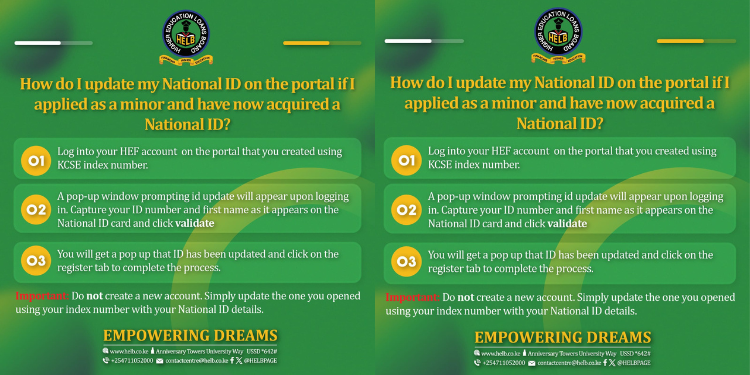
How to make the changes in your HEF account