Safaricom Issues Fresh Directive to Customers Over My OneApp Following Massive Complaints
Share

Telecommunications giant Safaricom has issued a fresh directive to customers using its My OneApp platform, urging them to update to the latest version following widespread user complaints about performance and login challenges.
In a notice shared with customers on Tuesday, April 28, 2026, the company stressed that the update is aimed at improving user experience, enhancing reliability, and addressing key concerns raised by users in recent weeks.
“Update My OneApp to the latest version for an improved experience!,” read part of the notice.
Safaricom Issues Fresh Directive to Customers Over My OneApp
Among the Key improvements is an enhanced login experience. Safaricom noted that the latest update significantly reduces the frequency of automatic logouts, allowing users to remain logged in while connected to Wi-Fi after their first successful login, without compromising security.z
Also Read: Safaricom Announces Fully Funded Scholarships for Select Students as Schools Reopen
The telco also announced several fixes across various in-app features, stating that the improvements are intended to boost overall performance and ensure smoother navigation. Customers have been encouraged to update immediately to benefit from the enhancements.
My OneApp integrates a wide range of services into a single platform, including access to M-PESA balances, airtime, data bundles, SMS, and Bonga points, eliminating the need to switch between multiple applications.
The app, launched on April 2, 2026, was designed to merge the MySafaricom App and the M-PESA App into a single platform, offering users a seamless all-in-one digital experience.
The platform also allows users to carry out transactions such as sending money, paying bills via Lipa na M-PESA, withdrawing cash, and purchasing airtime or data bundles. Additional services include managing home fibre connections and accessing business tools like Tunguza Business.
Safaricom further noted that the updated app offers a simplified interface with quicker access to frequently used services, improved visibility of account balances, and faster payment options such as Scan-to-Pay QR, AI Pay, and Near Field Communication (NFC)- enabled transactions.
How to Set Up My OneApp
To set up or update the app:
- Download or update My OneApp from the Google Play Store.
- Ensure your Safaricom SIM card is set as the primary line (SIM 1).
Also Read: Safaricom Moves to Address Concerns Over My OneApp
- Turn on mobile data and avoid using a VPN.
- Toggle Airplane Mode on and off, then open the app.
- Register using your phone number and enter the OTP sent to your device.
- Choose your preferred login method, biometric authentication or your M-PESA PIN.
Follow our WhatsApp channel for instant news updates
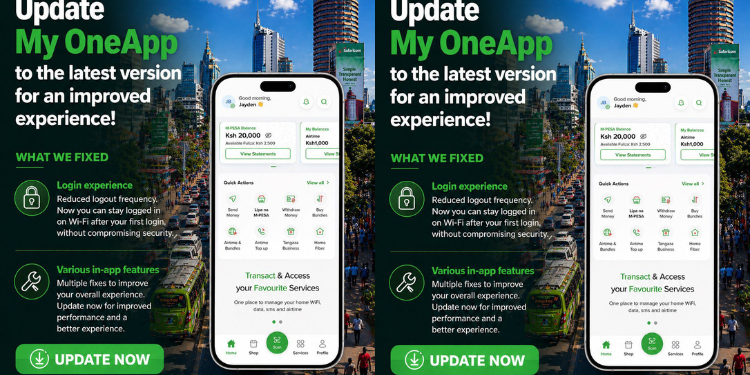
A collage photo of a poster showing the latest version of My OneAPP. PHOTO/Safaricom